
Confidence score
Confidence is a number from0.0 to 1.0. It starts at the value the author wrote (default 1.0) and is clamped to that range forever after:
0.9. A hypothesis that starts at certainty has nowhere to go but down, and the first failure will take it a long way.
Outcomes
When a run finishes, the agent commits an outcome. Four kinds are recognised, and they are not symmetric:
Failures weigh more than successes because trust should be easy to lose and slow to rebuild.
Four older names are still accepted as aliases:
clean_deploy (success),
regression (minor failure), p2_incident (failure), p1_incident
(critical failure).How an outcome moves confidence
Each outcome adds evidence to every entry it cited, and the entry’s confidence is the balance of that evidence against the author’s prior:- Severity. The weight in the table above.
- Credit split. The weight is divided across the entries the run relied on. An outcome that cited eight entries cannot hand each of them a full unit of evidence; one that cited a single entry gives it everything.
- Surprise. A failure on an entry trusted at
0.95counts nearly twice as much as one on an entry at0.5, and a success on an already-trusted entry counts for little. Confirmation of what everyone expected is weak evidence.
0.7 drops to about 0.26 on its first failure and lifts to about 0.82 on its first success.
First-strike tolerance
An entry with three or more successes and no failure yet is treated differently on its first failure: the surprise term is left out. A single failure against a long run of successes is more often the agent’s slip or a noisy environment than a change in the world. The entry is left contested at about0.62 instead of being discredited outright; a second failure in a row still discredits it (about 0.40). A real change in the world is unlearned in two strikes.
Evidence status
Every entry carries a label derived from its outcome record, and the briefing,retrieve() and the dashboard read the label rather than the raw number:
Nothing is deleted when an entry is discredited. It stays in history, its versions stay readable, and it comes back if the evidence does.
Regime shift
A regime shift is the record saying that a rule which used to work has just stopped: validated at least three times, latest outcome a failure within the last seven days, label no longervalidated. The briefing lists these in regime_shift, and guidance switches to explore for the scope, so agents try something other than the rule that just failed. The flag clears after the window — a rule discredited last month is history, not a reason to keep skipping what has been winning since.
What an outcome is credited to
Ifcausal_entry_keys is not given, the outcome is credited to what the agent read during the session:
The set is cleared after each
commit_outcome(), so the next task starts a fresh causal window.
Mark failed attempts
When a remembered fix did not work and the agent tries something else, it should say so before moving on:Name what you acted on
A briefing serves several entries and the agent follows one. Passingcausal_entry_keys on the outcome sends the result to that one; left unnamed, every entry read since the last boundary is charged, and a correct lesson that merely shared the context with a wrong one loses confidence alongside it.
Time decay (optional)
Outcomes are the only thing that changes stored confidence. Separately, the SDK can apply time decay on read, so that learning nobody has confirmed in a long time counts for less when compared againstmin_confidence. It is opt-in:
A fact with a 30-day half-life, 10 reads and one outcome has an effective half-life of about 204 days. Actively used, outcome-validated learning persists; cold, unvalidated beliefs fade.
Filtering by confidence
evidence_status to picking a threshold. An untested 0.9 and a validated 0.9 are different things to act on, and retrieve() already holds discredited entries back.
The feedback loop
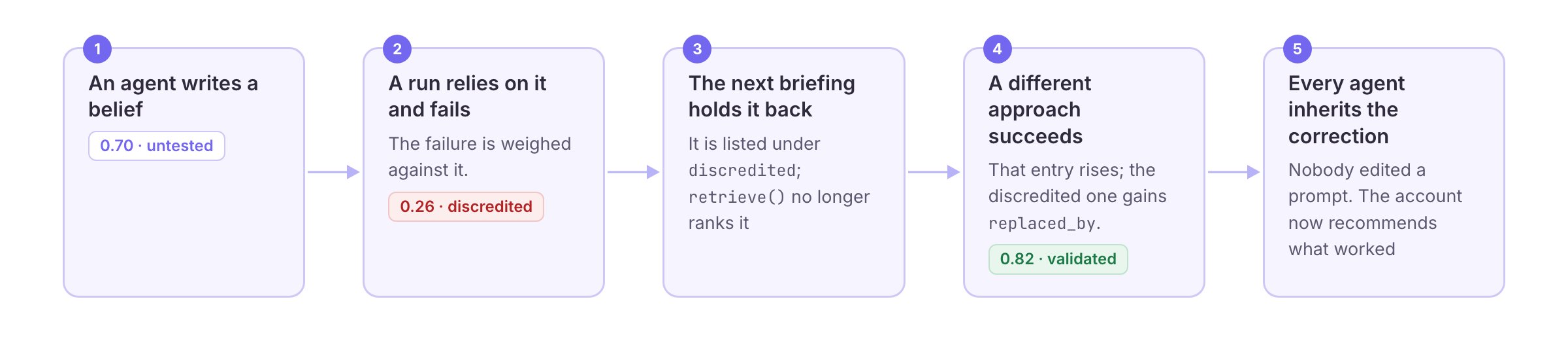
SenseLab also measures, per account, how much each kind of outcome should
count and how long learning stays useful, from your own history. See
ML Layer.